Wednesday, May 8, 2013

Business Card Design


Happy to report I submitted Dan's Business card and he loved it.


I think it came out pretty nice since all he gave me was he likes the colors red,yellow and black.


Sunday, May 5, 2013

Elder scrolls online-Mini map update

I've been playing around with this idea and came up with a few different concepts


Tried this one with their verison of the ouroboros. It didnt quite feel right ..

I was thinking of no border but i like the glass effect i made. I was also working on the size of the map.

I finished the night with this idea. I really like hace the knots in the background. It reminds me of the borders in oblivion for their text boxes.

Saturday, May 4, 2013

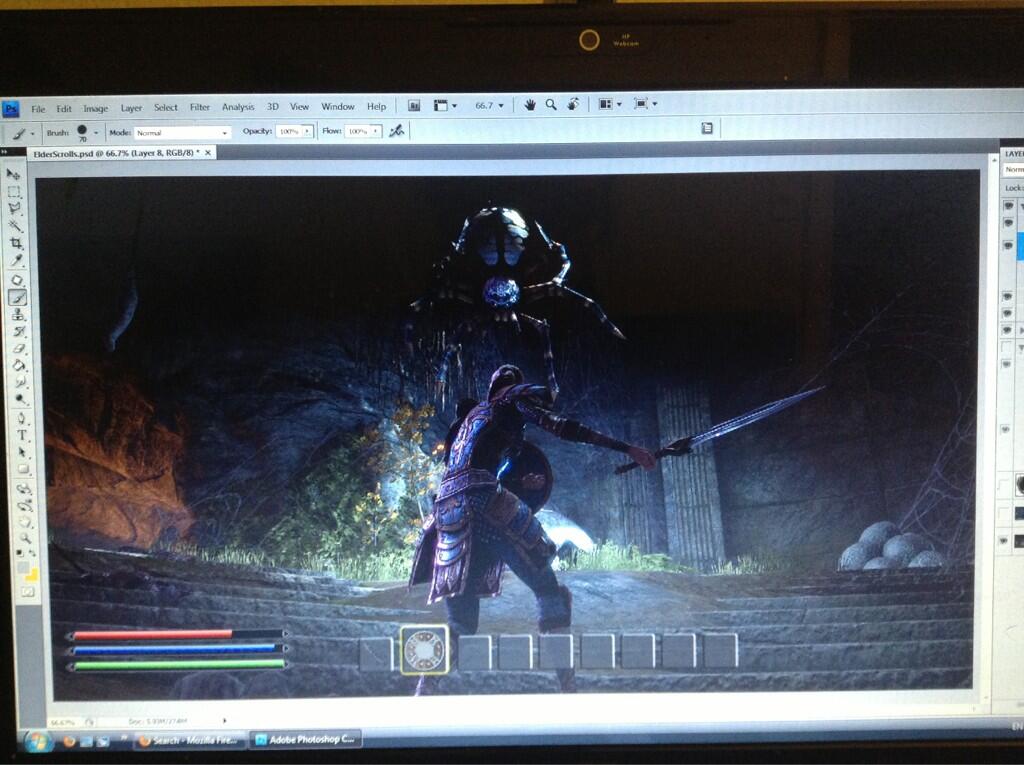
Elder Scrolls UI Mockup

Since I dont have the beta for Elder Scrolls I decided to make a mock up of what I thought it would look like.
I started off with this since it was close the Skyrim/Oblivion I played growing up.


Edit: I'm not a 100 percent sure what to do for the map. Where to do it like their style which from what i seen is a radial map or keep it true to the compass format that the other games had. or maybe do a rotating radial map. To infuse the two ideas.


Things I am adding or need to add:

Multiple skills (apparently you switch em out by clicking on them i hear?)
Experience bar
Target system- so you know who the heck you are selecting.
cross hair
Enemy bar
map system with icons.

I'll post more updates later

Wednesday, April 17, 2013

Allo there!

Sorry I havent been updating been very busy with work and other contracts.
So I decided to show you a rejected page from the Alphabet book I'm working on for Vikingo Games
It is a rejected page due to the similarities of Rocket to Astronaut. So it was scrapped to make way for another subject matter for R.
So without further ado here is R for Rocket.
 

This is a WIP piece. It features Deadpool and Weasel. (both owned by Marvel)
Been working off and on with this piece. I'll post up the final image when its done.

Tuesday, February 12, 2013

Solution to Unity Probelm

So I had this probelm where Unity thought my normals were flipped.

Thankfully after days of going to forums and researching a solution was found.

If you create a Shader script and paste this in

Shader "Custom/NewShader" {

Properties {

        _Color ("Main Color", Color) = (1,1,1,0)

        _MainTex ("Base (RGB)", 2D) = "white" {}

    }

    SubShader {

        Pass {

            Cull Off

            Material {

                Diffuse [_Color]

                Ambient [_Color]

            }

            Lighting On

            SetTexture [_MainTex] {

                Combine texture * primary DOUBLE, texture * primary

            }

        }

    }

}

Then you save. Create a material and select custom in the drop down menu. This will give you the option to pick your "New Shader"   Once you have it set up like that you just pick your texture for the mesh and apply to the mesh. VOILA le done.

Art of Wojtek Fus: Resources

Awesome Blog with tons of resources 

Art of Wojtek Fus: Resources:

Friday, February 8, 2013

Why dont you work?!


Been importing things into Unity recently. I've been exporting with .fbx from 3DS Max

So i have this astronaut that has an animation. But when I import in him into Unity it looks like his normals are flipped. They arent  in max but  the error is this weird see thru mesh thing...

Any way so far I've checked to make sure the shader is marked Diffuse instead of Transparent/Diffuse

Played with the Axis Converison... Going to do more research. Hopefully something works.